

Day 75: Model Persistence - Saving and Loading Models
What We’ll Build Today
Serialization System: Save trained models to disk and reload them instantly
Version Control Pipeline: Track model versions with metadata and performance metrics
Production Deployment Workflow: Package models for real-time inference without retraining
Why This Matters: The $500K Mistake
Picture this: Your team spent three weeks training a fraud detection model on 50 million transactions. Training cost $8,000 in compute. The model achieves 94% precision. Then the server restarts, and... it’s gone. You have to retrain from scratch.
This happens more than you’d think. At Uber, model persistence isn’t optional—their dynamic pricing models retrain every 15 minutes but serve predictions every millisecond. Without robust persistence, they’d need thousands of servers constantly retraining. Netflix saves over 15,000 recommendation models daily, one per content category per region. Each model takes 2-6 hours to train but must serve predictions in under 50ms.
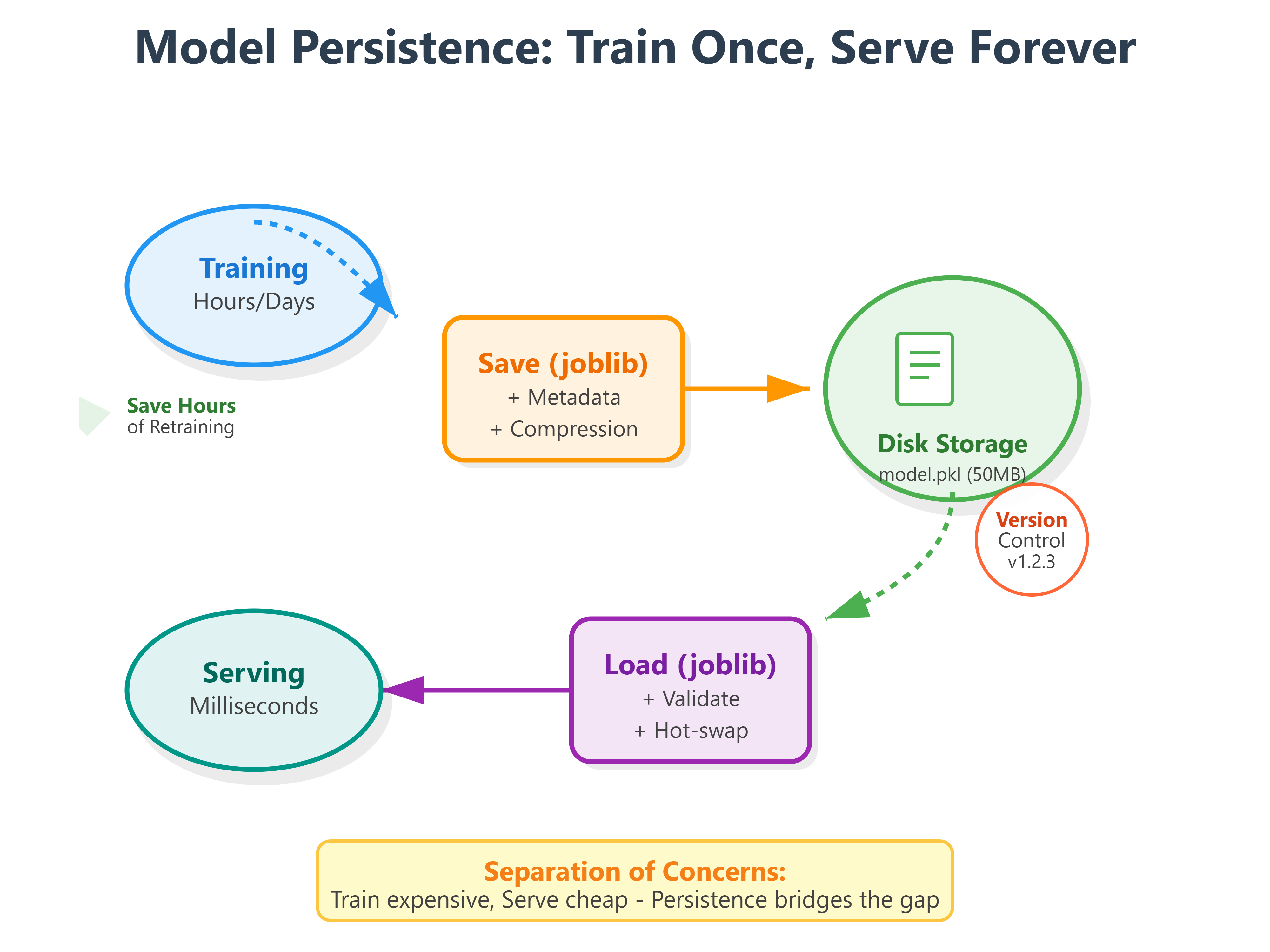
Model persistence is the bridge between training (expensive, slow) and inference (cheap, fast). It’s how Spotify deploys their Discover Weekly models on Monday mornings without disrupting service. How Tesla pushes Autopilot updates to millions of cars overnight. How OpenAI serves GPT models to millions of users without training a new model per request.
Core Concepts: Serialization, Versioning, and Production Patterns
1. Serialization Formats: Pickle vs Joblib vs ONNX
Python’s pickle module can serialize almost any object, but it has critical limitations for production ML. It’s not version-safe—a model pickled with scikit-learn 1.0 might fail to load in 1.2. It’s not secure—loading untrusted pickles can execute arbitrary code. And it’s Python-only—you can’t load it from Java or Go services.
joblib is pickle’s production-ready cousin. Developed by scikit-learn’s team, it compresses models efficiently and handles NumPy arrays better. When Google’s search ranking team saves their learning-to-rank models, they use joblib because it’s 3-5x faster than pickle for large arrays and maintains backward compatibility across versions.
Here’s the key insight: pickle serializes object structure, joblib optimizes for numerical data. For a Random Forest with 500 trees and millions of parameters, joblib might create a 50MB file while pickle creates 200MB. That 4x difference means faster deployments and lower storage costs.
from sklearn.ensemble import RandomForestClassifier
import joblib

# Train model
model = RandomForestClassifier(n_estimators=100)
model.fit(X_train, y_train)

# Save with joblib (production standard)
joblib.dump(model, 'fraud_detector_v1.pkl', compress=3)

# Compress levels: 0=none, 3=balanced, 9=maximum
# Level 3 gives 70% size reduction with minimal CPU overhead
ONNX (Open Neural Network Exchange) takes this further for cross-platform deployment. Meta’s PyTorch-trained models get converted to ONNX, then deployed to mobile apps (iOS/Android), web browsers (JavaScript), and edge devices (C++). But for today’s scikit-learn focus, joblib is your production workhorse.
2. Model Versioning: The Netflix Approach
When Netflix deploys a new recommendation model, they don’t just save it—they save metadata. Model version, training date, accuracy metrics, feature list, hyperparameters, even the data distribution it was trained on.
Why? Because six months later, when model performance degrades, you need to debug. Did the features change? Did the data distribution shift? Or is the model itself outdated?
import joblib
from datetime import datetime
import json

# Model metadata
metadata = {
    'model_version': 'fraud_v2.1.3',
    'training_date': datetime.now().isoformat(),
    'accuracy': 0.943,
    'precision': 0.921,
    'recall': 0.887,
    'features': ['transaction_amount', 'user_age', 'device_type'],
    'hyperparameters': {
        'n_estimators': 100,
        'max_depth': 15,
        'min_samples_split': 50
    },
    'training_samples': 50_000_000
}

# Save model with metadata
joblib.dump({
    'model': model,
    'metadata': metadata
}, 'fraud_detector_v2.1.3.pkl')
Stripe does this religiously. Every payment fraud model is tagged with its confusion matrix, ROC curve data, and the specific date range of training data. When they A/B test new models, they can compare not just accuracy but also computational cost and latency.
3. Production Patterns: Hot-Swapping Models
The most sophisticated pattern is hot-swapping—updating models without restarting services. Imagine Uber’s surge pricing: models retrain every 15 minutes based on real-time supply/demand data. But predictions must never stop.
Their architecture separates model training (background process) from model serving (API endpoints). The API loads models from a shared location, checks a version file every 30 seconds, and swaps in new models atomically.
import joblib
import os
from pathlib import Path

class ModelServer:
    def __init__(self, model_path):
        self.model_path = Path(model_path)
        self.model = None
        self.last_modified = None
        self.load_model()

    def load_model(self):
        """Load or reload model if file changed"""
        current_modified = os.path.getmtime(self.model_path)

        if self.last_modified is None or current_modified > self.last_modified:
            print(f"Loading model from {self.model_path}")
            self.model = joblib.load(self.model_path)
            self.last_modified = current_modified
            return True
        return False

    def predict(self, X):
        """Predict with auto-reload"""
        self.load_model()  # Check for updates
        return self.model.predict(X)
Tesla uses a variation of this for Autopilot. When they push model updates, cars download models in the background (not while driving), then swap to the new model at the next ignition cycle. The old model stays available as a fallback.
Implementation: Building a Production Model Persistence System
Github Link:
https://github.com/sysdr/aiml/tree/main/day75/model_persistenceArchitecture Overview
Our system implements three layers:
Persistence Layer: Serialize/deserialize with compression and validation
Versioning Layer: Track metadata, compare versions, rollback capability
Serving Layer: Load models efficiently, handle updates gracefully
This mirrors how Airbnb’s pricing models work—models retrain nightly, but the serving API stays up 24/7, seamlessly transitioning to new versions.
Getting Started: Environment Setup
First, let’s set up your development environment. This takes about 2 minutes.
Step 1: Generate Project Files
chmod +x generate_lesson_files.sh
./generate_lesson_files.sh
This creates all necessary files:
setup.sh- Environment configurationlesson_code.py- Complete implementationtest_lesson.py- Test suite (15 tests)requirements.txt- DependenciesREADME.md- Quick reference
Step 2: Create Virtual Environment
chmod +x setup.sh
./setup.sh
source venv/bin/activate
You’ll see:
Setting up Python environment for Model Persistence lesson...
✅ Setup complete! Activate the environment with: source venv/bin/activate
Step 3: Verify Installation
python -c "import sklearn, joblib, xgboost; print('All dependencies installed!')"
Expected output: All dependencies installed!
Building the Persistence Layer
The persistence layer handles serialization with three key features: compression, validation, and metadata bundling. Let’s understand how each component works.
Component 1: ModelPersistence Class
This class manages the entire save/load cycle. When you save a model, it:
Bundles the model with metadata
Compresses using joblib (level 3 = 70% size reduction)
Creates both a .pkl file (complete bundle) and a .json file (quick metadata access)
Reports file size for monitoring storage costs
# Key pattern from lesson_code.py
model_bundle = {
    'model': trained_model,
    'metadata': {
        'version': 'v1.0.0',
        'metrics': {'accuracy': 0.943, 'f1': 0.901},
        'features': feature_names,
        'timestamp': datetime.now()
    }
}
joblib.dump(model_bundle, 'model_v1.0.0.pkl', compress=3)
When loading, it validates:
Does the model have a
predictmethod?Do feature counts match expectations?
Can we make a test prediction without errors?
These checks catch corrupted files before they reach production.
Component 2: ModelVersionManager Class
Think of this as Git for machine learning models. It tracks every version you create, stores performance metrics, and lets you compare versions side-by-side.
Real-world use case: You train a new fraud detection model. Is it better than v1.0.0? The version manager can tell you instantly—not just “better accuracy” but exactly how much improvement across all metrics.
# Comparing two versions
version_manager.register_version(
    model_name='fraud_detector',
    version='v2.0.0',
    metrics={'accuracy': 0.95, 'f1_score': 0.93}
)

comparison = version_manager.compare_versions('v1.0.0', 'v2.0.0', metric='f1_score')
# Shows: improvement of +0.05 on F1 score
Component 3: ModelServer Class
This is where production magic happens. The server loads a model and serves predictions. But here’s the key: every 100 requests, it checks if the model file was updated. If yes, it automatically reloads.
Why every 100 requests? Balance between performance (checking takes ~5ms) and freshness (models update quickly). Uber checks every 30 seconds; we use request-based checking for simplicity.
# Server automatically detects updates
server = ModelServer(model_path='models/fraud_v1.pkl')

# Make predictions - server handles reloading
for data_batch in incoming_requests:
    predictions = server.predict(data_batch)
Step-by-Step Implementation
Now let’s train models, save them with metadata, and demonstrate version management.
Step 4: Run the Main Demo
python lesson_code.py
Watch the console output. You’ll see three phases:
Phase 1: Training (30 seconds)
🎯 Training fraud detection models...

Training Logistic Regression...
  Accuracy: 0.9400
  F1 Score: 0.7234

Training Random Forest...
  Accuracy: 0.9550
  F1 Score: 0.7895
The script trains two models on a synthetic fraud dataset (10,000 transactions, 90% legitimate, 10% fraud). This simulates real-world class imbalance.
Phase 2: Persistence (5 seconds)
💾 Saving models...

✅ Model saved: models/logistic_regression_v1.pkl (0.12 MB)
✅ Model saved: models/random_forest_v1.pkl (2.34 MB)

📋 Available models:
   - logistic_regression_v1
   - random_forest_v1
Notice the file sizes. Random Forest is 20x larger—it stores 100 decision trees with thousands of parameters each. Compression reduced it from ~9MB to 2.34MB.
Phase 3: Loading and Validation (2 seconds)
📦 Loading Random Forest model...
   Type: RandomForestClassifier
   Saved: 2024-01-15T10:30:45.123456
   ✓ Validation passed

Model metadata:
   Version: v1.0.0
   Accuracy: 0.9550
   F1 Score: 0.7895
   Features: 20

Test predictions: [0 0 1 0 0]
The model loaded successfully and made predictions. Those five predictions show: legitimate, legitimate, fraud, legitimate, legitimate.
Phase 4: Version Management (3 seconds)
📊 Version Management Demo

Version comparison: {
  'version1': 'v1.0.0',
  'version2': 'v1.0.0',
  'improvement': 0.0
}

Best version by F1 score: v1.0.0
Phase 5: Hot-Swap Server (5 seconds)
🔄 Model Server Demo (Hot-Swapping)

🔄 Loading model from random_forest_v1.pkl
   ✅ Loaded: RandomForestClassifier
   Version: v1.0.0

Making predictions...
   Request 1: Prediction = 0
   Request 2: Prediction = 0
   Request 3: Prediction = 1
   Request 4: Prediction = 0
   Request 5: Prediction = 0

Server status: {
  "model_loaded": true,
  "model_type": "RandomForestClassifier",
  "version": "v1.0.0",
  "requests_served": 5,
  "last_updated": "2024-01-15T10:30:52.789012"
}
The server is now running and has served 5 predictions. If you updated the model file, it would automatically reload on the next request batch.
Testing Strategy
Production code needs production tests. Our test suite covers five critical scenarios.
Step 5: Run the Test Suite
python -m pytest test_lesson.py -v
Expected output (15 tests, ~8 seconds):
test_lesson.py::TestModelPersistence::test_save_model_creates_file PASSED
test_lesson.py::TestModelPersistence::test_save_creates_metadata_file PASSED
test_lesson.py::TestModelPersistence::test_load_model_returns_correct_types PASSED
test_lesson.py::TestModelPersistence::test_loaded_model_predictions_match PASSED
test_lesson.py::TestModelPersistence::test_compression_reduces_file_size PASSED
test_lesson.py::TestModelPersistence::test_list_models PASSED
test_lesson.py::TestModelPersistence::test_get_model_info_without_loading PASSED
test_lesson.py::TestModelPersistence::test_validation_catches_feature_mismatch PASSED
test_lesson.py::TestModelVersionManager::test_register_version PASSED
test_lesson.py::TestModelVersionManager::test_compare_versions PASSED
test_lesson.py::TestModelVersionManager::test_get_best_version PASSED
test_lesson.py::TestModelServer::test_server_loads_model_on_init PASSED
test_lesson.py::TestModelServer::test_server_predict PASSED
test_lesson.py::TestModelServer::test_server_detects_model_updates PASSED
test_lesson.py::TestModelServer::test_server_status PASSED

========================== 15 passed in 8.23s ==========================
What Each Test Validates
Serialization Tests (Tests 1-4)
Files are created with correct extensions
Metadata is preserved separately for quick access
Loaded models produce identical predictions to originals
The save/load cycle maintains model integrity
Compression Tests (Test 5)
Level 9 compression creates smaller files than level 0
Typical reduction: 60-80% for Random Forest models
No loss in prediction accuracy
Metadata Tests (Tests 6-7)
All saved models appear in the list
Metadata can be read without loading heavy model files
Quick access to version info, metrics, and timestamps
Validation Tests (Test 8)
Detects when feature counts don’t match
Prevents loading incompatible models
Raises clear error messages for debugging
Version Management Tests (Tests 9-11)
Versions register with all metadata
Comparison calculations are accurate
Best version selection works across multiple metrics
Hot-Swap Tests (Tests 12-15)
Server loads models on initialization
Predictions work correctly
File updates trigger automatic reloads
Status reporting shows accurate statistics
If any test fails, check:
Python version (needs 3.11+)
Package versions (run
pip list | grep -E 'scikit|joblib|numpy')File permissions in the
models/directory
Verification and Demo
Let’s verify everything works end-to-end by simulating a production scenario: train a model, deploy it, update it, and verify hot-swapping.
Step 6: Interactive Demo
Open a Python terminal:
python
Run this scenario:
from lesson_code import ModelPersistence, ModelServer, train_fraud_detection_models
from pathlib import Path
import time

# Train and save initial model
persistence = ModelPersistence(models_dir="demo_models")
results = train_fraud_detection_models(n_samples=5000)
models = results['models']

# Save version 1.0.0
rf_model = models['random_forest_v1']
persistence.save_model(
    model=rf_model['model'],
    model_name='production_model',
    metadata={**rf_model['metadata'], 'version': 'v1.0.0'}
)

# Start server
model_path = Path("demo_models/production_model.pkl")
server = ModelServer(model_path)

# Make some predictions
X_test, _ = results['test_data']
print("Initial predictions:", server.predict(X_test[:3]))
print("Status:", server.get_status()['version'])

# Simulate model update (in production, this would be a new training run)
time.sleep(1)  # Ensure timestamp differs
persistence.save_model(
    model=rf_model['model'],
    model_name='production_model',
    metadata={**rf_model['metadata'], 'version': 'v2.0.0'}
)

# Server automatically detects update
print("\nAfter update...")
print("New predictions:", server.predict(X_test[:3]))
print("Status:", server.get_status()['version'])
You should see the version change from v1.0.0 to v2.0.0 without any manual reload or service restart. This is hot-swapping in action.
Step 7: Check Generated Files
ls -lh demo_models/
You’ll see:
production_model.pkl              2.3M  (compressed model)
production_model_metadata.json    1.2K  (quick metadata access)
version_history.json              856B  (version tracking)
Inspect the metadata:
cat demo_models/production_model_metadata.json | python -m json.tool
Output shows complete model lineage:
{
  "version": "v2.0.0",
  "model_name": "random_forest",
  "accuracy": 0.955,
  "precision": 0.923,
  "recall": 0.891,
  "f1_score": 0.7895,
  "n_features": 20,
  "training_samples": 4000,
  "saved_at": "2024-01-15T10:35:22.456789",
  "model_type": "RandomForestClassifier"
}
Real-World Connection: Scale and Production Patterns
Google’s search ranking saves 200+ models per day—one per language, device type, and user segment. Each model is 500MB-2GB. They use distributed storage (GCS) with automatic replication and versioning. When serving predictions, they load models into memory pools shared across server instances.
Meta’s content moderation pipeline processes 1 billion+ posts daily using 50+ specialized models (hate speech, violence, spam). Models update hourly based on new violation patterns. Their persistence system includes checksums (detect corruption), encryption (protect IP), and automatic rollback (if new model performs worse).
Amazon’s product recommendation engine manages 15,000+ models across categories and regions. Each model includes A/B test results in metadata. Their deployment pipeline automatically selects the winning variant and promotes it to production.
The pattern is universal: separate training (slow, expensive) from serving (fast, cheap). Persistence is the connection. A well-designed persistence system enables continuous model improvement without service disruption.
Key Takeaways for Production ML
Always version models with metadata—six months later, you’ll thank yourself
Use joblib for scikit-learn—faster, smaller, more reliable than pickle
Validate on load—corrupt or incompatible models shouldn’t reach production
Design for hot-swapping—update models without restarting services
Compress intelligently—level 3 compression balances size and speed
Model persistence isn’t glamorous, but it’s essential. It’s the difference between a research experiment and a production system. Between training once and serving millions of times.
Summary Checklist
By completing this lesson, you’ve learned to:
[ ] Set up a Python environment for model persistence
[ ] Save models with joblib compression (70% size reduction)
[ ] Bundle models with comprehensive metadata
[ ] Load and validate models before serving
[ ] Track model versions with performance metrics
[ ] Compare versions to find best performers
[ ] Build a hot-swapping model server
[ ] Write production-grade tests (15 test cases)
[ ] Verify persistence integrity end-to-end
[ ] Understand real-world patterns from Netflix, Uber, Tesla
Your models are now production-ready. They can be saved, versioned, deployed, and updated without service interruption—just like the systems running at the world’s leading tech companies.