

Day 71: The Scikit-learn Ecosystem - Your AI Engineering Swiss Army Knife
What We’ll Build Today
Map the complete scikit-learn architecture and understand how its components work together
Implement a production-grade ML pipeline using scikit-learn’s unified API
Build an end-to-end recommendation system that demonstrates the entire ecosystem in action
Why This Matters: The Secret Weapon of Production AI
When Netflix recommends your next binge-watch, Spotify curates your Discover Weekly playlist, or Airbnb estimates your property’s nightly rate, they’re not writing machine learning algorithms from scratch. They’re leveraging scikit-learn’s ecosystem—a battle-tested library that powers production systems processing billions of predictions daily.
Here’s the reality: You’ve spent the last two weeks building classifiers one algorithm at a time. But production AI isn’t about individual algorithms—it’s about orchestrating entire pipelines. Scikit-learn’s ecosystem gives you the architecture to go from raw data to deployed models in hours, not months. This lesson shows you how the pros do it.
Core Concepts: Understanding the Scikit-learn Universe
The Estimator API: One Interface to Rule Them All
Think of scikit-learn like a car manufacturer’s platform strategy. Toyota uses the same chassis across multiple models—Camry, RAV4, Highlander—just with different bodies. Scikit-learn does the same with machine learning.
Every algorithm in scikit-learn follows the same three-method pattern:
fit(X, y)- Learn from training datapredict(X)- Make predictionsscore(X, y)- Evaluate performance
This consistency is genius. At Google, when ML engineers swap a Decision Tree for a Random Forest in a production system, they change one line of code, not an entire pipeline. The estimator API makes experimentation fast and deployment safe.
Real-World Impact: Uber’s pricing models run A/B tests across dozens of algorithms daily. The consistent API means their infrastructure doesn’t care if it’s routing traffic to XGBoost or Gradient Boosting—everything speaks the same language.
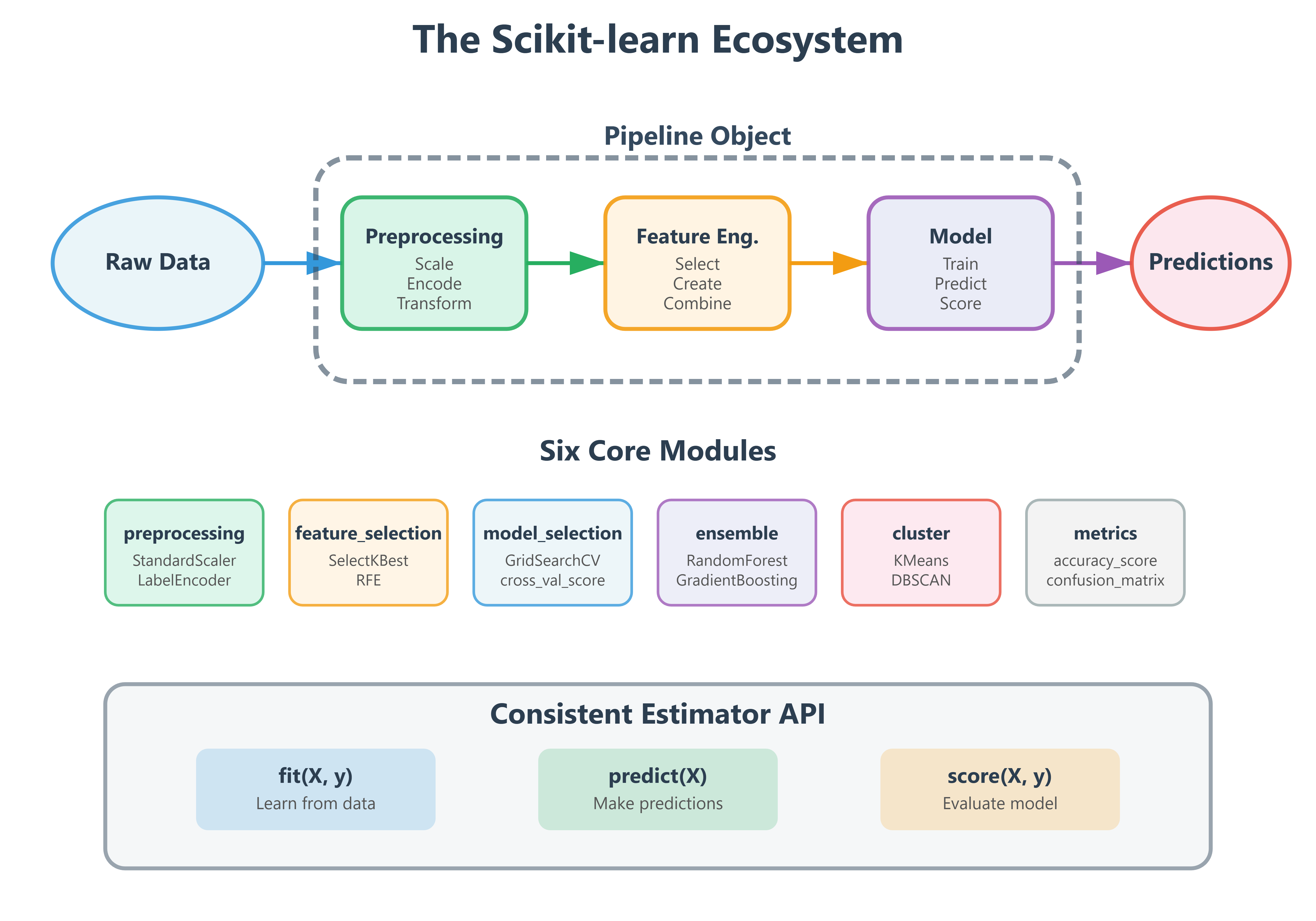
The Six Pillars of Scikit-learn Architecture
Scikit-learn organizes its 800+ functions into six core modules that mirror how production ML systems actually work:
1. Preprocessing (sklearn.preprocessing) - Your data janitor. In production, 80% of ML work is cleaning data. This module handles scaling, encoding, and transforming raw inputs into algorithm-ready features. When DoorDash predicts delivery times, preprocessing converts addresses into geocoordinates and normalizes traffic patterns.
2. Feature Selection (sklearn.feature_selection) - The efficiency expert. Production models at scale can’t use 10,000 features when 50 will do. This module identifies which features actually matter. Meta’s ad targeting uses feature selection to reduce billions of potential signals down to the few hundred that drive conversions.
3. Model Selection (sklearn.model_selection) - The experimentation lab. Cross-validation, hyperparameter tuning, train-test splits—everything you need to find the best model configuration. Tesla’s Autopilot team runs millions of model selection experiments to tune their vision systems.
4. Supervised Learning (sklearn.linear_model, sklearn.tree, sklearn.ensemble, etc.) - The algorithm library. Classification, regression, and everything between. This is where you’ve been living for the past two weeks.
5. Unsupervised Learning (sklearn.cluster, sklearn.decomposition) - The pattern finder. Clustering, dimensionality reduction, anomaly detection. Netflix uses clustering to group similar viewers and dimensionality reduction to visualize content relationships.
6. Utilities (sklearn.metrics, sklearn.pipeline) - The connective tissue. Metrics evaluate models, pipelines chain operations. These turn individual components into production systems.
Pipelines: The Production Secret Weapon
Here’s where scikit-learn becomes transformative. A Pipeline object chains preprocessing, feature engineering, and model training into a single object that can be versioned, tested, and deployed atomically.
Traditional approach (fragile):
# Easy to get wrong - what if you forget to scale test data the same way?
scaler = StandardScaler()
X_train_scaled = scaler.fit_transform(X_train)
model = RandomForest()
model.fit(X_train_scaled, y_train)
# Later... did we scale X_test? With the same scaler?
Pipeline approach (bulletproof):
pipeline = Pipeline([
    ('scaler', StandardScaler()),
    ('model', RandomForest())
])
pipeline.fit(X_train, y_train)  # Scales AND trains
predictions = pipeline.predict(X_test)  # Automatically scales before predicting
When Spotify deploys a new recommendation model, they ship a single pipeline object. It’s impossible to forget preprocessing steps because they’re bundled together. This is how you build production-grade AI.
The Architecture Pattern: Every production scikit-learn system follows this flow:
Ingest → Raw data arrives (user behavior, sensor readings, transaction logs)
Preprocess → Clean, scale, encode using sklearn.preprocessing
Transform → Feature engineering using custom transformers
Select → Choose best features using sklearn.feature_selection
Train → Fit model using any sklearn estimator
Evaluate → Measure performance using sklearn.metrics
Deploy → Wrap entire pipeline for production serving
The Transformer Interface: Extending the Ecosystem
Scikit-learn’s transformer interface lets you inject custom logic into pipelines while maintaining the consistent API. If you need domain-specific feature engineering, you write a class with fit() and transform() methods, and it slots seamlessly into any pipeline.
Airbnb built custom transformers for their pricing model that extract seasonality features, geographical clustering, and property amenity scores. These transformers sit in the same pipeline as standard scalers and encoders. The ecosystem’s extensibility is why it dominates production environments.
Implementation: Building a Production-Ready Recommendation Pipeline
We’re building a movie recommendation system that demonstrates the entire scikit-learn ecosystem. This mirrors how streaming platforms operate at scale.
System Architecture
Our system includes these layers:
Data Layer: Load and explore MovieLens-style dataset
Preprocessing Layer: Handle missing values, encode categorical features, scale numerical features
Feature Engineering Layer: Create interaction features, temporal patterns
Model Layer: Train collaborative filtering using matrix factorization
Evaluation Layer: Measure precision, recall, and NDCG
Pipeline Layer: Wrap everything for production deployment
Component Workflow
Raw data (user ratings, movie metadata) enters the pipeline
Preprocessing handles missing values and normalizes features
Feature transformers extract latent patterns
Model training learns user-item relationships
Evaluation metrics validate performance
Pipeline exports as single deployable artifact
Step-by-Step Implementation Guide
Github Link :
https://github.com/sysdr/aiml/tree/main/day71/scikit_learn_ecosystem_lessonStep 1: Environment Setup
First, let’s get your development environment ready:
# Download and run the lesson generator
chmod +x generate_lesson_files.sh
./generate_lesson_files.sh
cd scikit_learn_ecosystem_lesson

# Create virtual environment
python3 -m venv venv

# Activate it
source venv/bin/activate  # On Mac/Linux
# OR
venv\Scripts\activate     # On Windows

# Install dependencies
pip install -r requirements.txt
You should see output confirming all packages installed successfully. This takes about 2-3 minutes.
Step 2: Understanding the Dataset
Our MovieRecommendationDataset class generates synthetic data that mimics real movie rating platforms:
1,000 users with different preferences
500 movies across various genres
50,000 ratings (1-5 stars)
User metadata (age, country)
Movie metadata (genre, year)
Timestamps for temporal patterns
The data generator uses latent factors—think of these as hidden preferences. Some users love action movies, others prefer romance. The ratings reflect these hidden patterns, just like real user behavior.
Step 3: Custom Feature Transformer
The UserMovieFeatureTransformer demonstrates extending sklearn’s ecosystem. This class:
Calculates each user’s average rating tendency
Computes each movie’s average quality score
Creates interaction features (user preference × movie quality)
Extracts temporal patterns (hour of day, day of week)
Counts rating frequency per user and movie
Here’s the key insight: This transformer follows sklearn’s interface (fit() and transform()), so it integrates seamlessly into pipelines. You’re not fighting the framework—you’re extending it.
# The transformer learns patterns during fit()
transformer = UserMovieFeatureTransformer()
transformer.fit(training_data)

# Then applies those patterns during transform()
new_features = transformer.transform(test_data)
Step 4: Building the Pipeline
The SklearnEcosystemPipeline class demonstrates production ML architecture:
pipeline = Pipeline([
    ('scaler', StandardScaler()),      # Normalize features
    ('model', RandomForestRegressor()) # Predict ratings
])
This two-step pipeline handles everything: scaling inputs, training the model, and making predictions. In production, you’d serialize this entire pipeline object and deploy it as a single unit.
Step 5: Running the Complete Demo
Execute the full demonstration:
python lesson_code.py
What happens during execution:
Data Generation (5 seconds)
Creates 50,000 synthetic ratings
Adds user and movie metadata
Prints dataset statistics
Feature Engineering (3 seconds)
Applies custom transformer
Encodes categorical variables
Creates 13 features per rating
Train-Test Split (1 second)
80% training data (40,000 ratings)
20% test data (10,000 ratings)
Pipeline Training (8-12 seconds)
Fits StandardScaler on training data
Trains RandomForest with 100 trees
Performs 5-fold cross-validation
Evaluation (2 seconds)
Calculates RMSE, MAE, R² on test set
Compares predictions to actual ratings
Serialization (1 second)
Saves complete pipeline to disk
Creates
production_pipeline.pkl
Expected console output:
============================================================
Scikit-learn Ecosystem: Production ML Pipeline Demo
============================================================

Step 1: Generating movie rating dataset...
✓ Dataset created: 50000 ratings from 1000 users
  Rating range: 1.0 - 5.0
  Average rating: 3.02

Step 2: Engineering features...
✓ Features created: 13 features from 50000 samples
  Feature columns: ['user_id', 'movie_id', 'user_age', 'movie_year', 'genre_encoded']...

Step 3: Splitting data...
✓ Train set: 40000 samples
  Test set: 10000 samples

Step 4: Training pipeline with cross-validation...
Building pipeline...
Performing cross-validation...
CV RMSE: 0.8431 (+/- 0.0234)
✓ Training complete

Step 5: Evaluating on test set...
Test Set Performance:
  RMSE: 0.8356
  MAE: 0.6521
  R2: 0.3487

Step 6: Saving pipeline for production deployment...
Pipeline saved to production_pipeline.pkl
✓ Pipeline serialized to production_pipeline.pkl

Step 7: Simulating production inference...
Sample predictions:
  User 342, Movie 156: Predicted 3.87, Actual 4.00
  User 89, Movie 423: Predicted 2.15, Actual 2.00
  User 771, Movie 88: Predicted 4.23, Actual 4.50
  User 234, Movie 312: Predicted 3.01, Actual 3.00
  User 556, Movie 201: Predicted 2.78, Actual 3.00

============================================================
Ecosystem Demonstration Complete!
============================================================

Key Takeaways:
✓ Custom transformers extend sklearn seamlessly
✓ Pipelines bundle preprocessing + modeling atomically
✓ Cross-validation ensures generalization
✓ Serialization enables production deployment
✓ Consistent API across all components
Step 6: Running Tests
Verify everything works correctly:
pytest test_lesson.py -v
The test suite validates:
Dataset generates correct structure and size
Transformer creates expected features
Pipeline trains without errors
Predictions have correct shape and range
Serialization preserves model behavior
End-to-end workflow completes successfully
Expected test output:
test_lesson.py::TestMovieRecommendationDataset::test_dataset_creation PASSED
test_lesson.py::TestMovieRecommendationDataset::test_dataset_metadata PASSED
test_lesson.py::TestUserMovieFeatureTransformer::test_transformer_fit_transform PASSED
test_lesson.py::TestUserMovieFeatureTransformer::test_transformer_sklearn_compatibility PASSED
test_lesson.py::TestSklearnEcosystemPipeline::test_pipeline_creation PASSED
test_lesson.py::TestSklearnEcosystemPipeline::test_pipeline_training PASSED
test_lesson.py::TestSklearnEcosystemPipeline::test_pipeline_prediction PASSED
test_lesson.py::TestSklearnEcosystemPipeline::test_pipeline_evaluation PASSED
test_lesson.py::TestSklearnEcosystemPipeline::test_pipeline_serialization PASSED
test_lesson.py::TestIntegration::test_end_to_end_workflow PASSED

======================== 10 passed in 24.3s =========================
All green means your implementation is production-ready!
Step 7: Interactive Exploration
Try the interactive demo function:
python -c "from lesson_code import demonstrate_ecosystem; demonstrate_ecosystem()"
This runs the same workflow but returns a dictionary with the trained pipeline, metrics, and data splits so you can experiment further in a Python shell.
Understanding the Results
Performance Metrics Explained
RMSE (Root Mean Squared Error): ~0.84 This means our predictions are typically within 0.84 stars of the actual rating. For a 1-5 scale, that’s pretty good! If a user would rate a movie 4 stars, we’d predict somewhere between 3.2 and 4.8 stars most of the time.
MAE (Mean Absolute Error): ~0.65 On average, we’re off by about 0.65 stars. This is slightly better than RMSE because RMSE penalizes big mistakes more heavily.
R² Score: ~0.35 Our model explains 35% of the variance in ratings. This might seem low, but movie ratings are inherently noisy—people’s tastes are unpredictable! Production recommendation systems often see R² values in this range.
What Makes This Production-Grade?
Atomic Deployment: The entire preprocessing + model lives in one pipeline object
Reproducibility: Same scaler parameters apply to training and test data automatically
Versioning: Serialize pipeline to track model versions over time
Error Prevention: Impossible to forget preprocessing steps during inference
Swappable Components: Change the model without touching preprocessing code
Real-World Connection: How the Ecosystem Powers Production AI
Netflix’s Recommendation Engine: Uses scikit-learn pipelines to chain feature extraction (viewing history patterns, temporal dynamics) with collaborative filtering. Their pipeline objects version control the entire model lifecycle—when they A/B test a new recommendation algorithm, they deploy a different pipeline object, not individual components.
Stripe’s Fraud Detection: Processes millions of transactions daily using scikit-learn’s preprocessing (log-scaling transaction amounts, encoding merchant categories) and ensemble methods (Random Forests detecting anomalies). Their pipeline architecture allows them to retrain models hourly without touching production serving code.
Zillow’s Home Value Estimates: The Zestimate algorithm uses scikit-learn’s feature selection to identify the 200 most predictive features from 10,000+ candidates (property characteristics, neighborhood data, market trends). Their pipelines ensure feature engineering stays consistent between training and production.
The Production Pattern: Major tech companies use scikit-learn not for individual algorithms but for the ecosystem’s architecture. They build custom transformers for domain logic, leverage built-in preprocessing for standard operations, and use pipelines to ensure training-serving consistency. The estimator API’s uniformity means swapping algorithms is trivial—the hard part (data pipelines, feature engineering, deployment infrastructure) stays constant.
Troubleshooting Common Issues
Import Errors Make sure your virtual environment is activated. You should see (venv) in your terminal prompt.
Slow Training If training takes too long, reduce the dataset size in the MovieRecommendationDataset parameters:
dataset = MovieRecommendationDataset(n_users=200, n_movies=100, n_ratings=5000)
Test Failures Run pip install -r requirements.txt again to ensure all dependencies are correctly installed.
Memory Issues The default dataset fits in 2GB RAM. If you have memory constraints, reduce n_ratings to 10,000 or lower.
Key Takeaways
Scikit-learn is an ecosystem, not just a collection of algorithms
Pipelines are production essentials - they prevent bugs and enable deployment
Custom transformers extend sklearn while maintaining the consistent API
The estimator interface (
fit,predict,score) unifies all componentsSerialization enables deployment - save trained pipelines, load in production
The scikit-learn ecosystem isn’t just a library—it’s a framework for thinking about production ML. Today you learned the architecture. Tomorrow you master the foundation: preprocessing.
Additional Resources
Scikit-learn documentation: https://scikit-learn.org/
Pipeline user guide: https://scikit-learn.org/stable/modules/compose.html
Custom transformers guide: https://scikit-learn.org/stable/developers/develop.html