


Video:
What We'll Build Today
Smart data containers that organize information like an AI agent's memory
Feature vectors that represent real-world data points for machine learning
A mini dataset processor that mimics how AI systems handle training data
Why This Matters: The Foundation of AI Memory
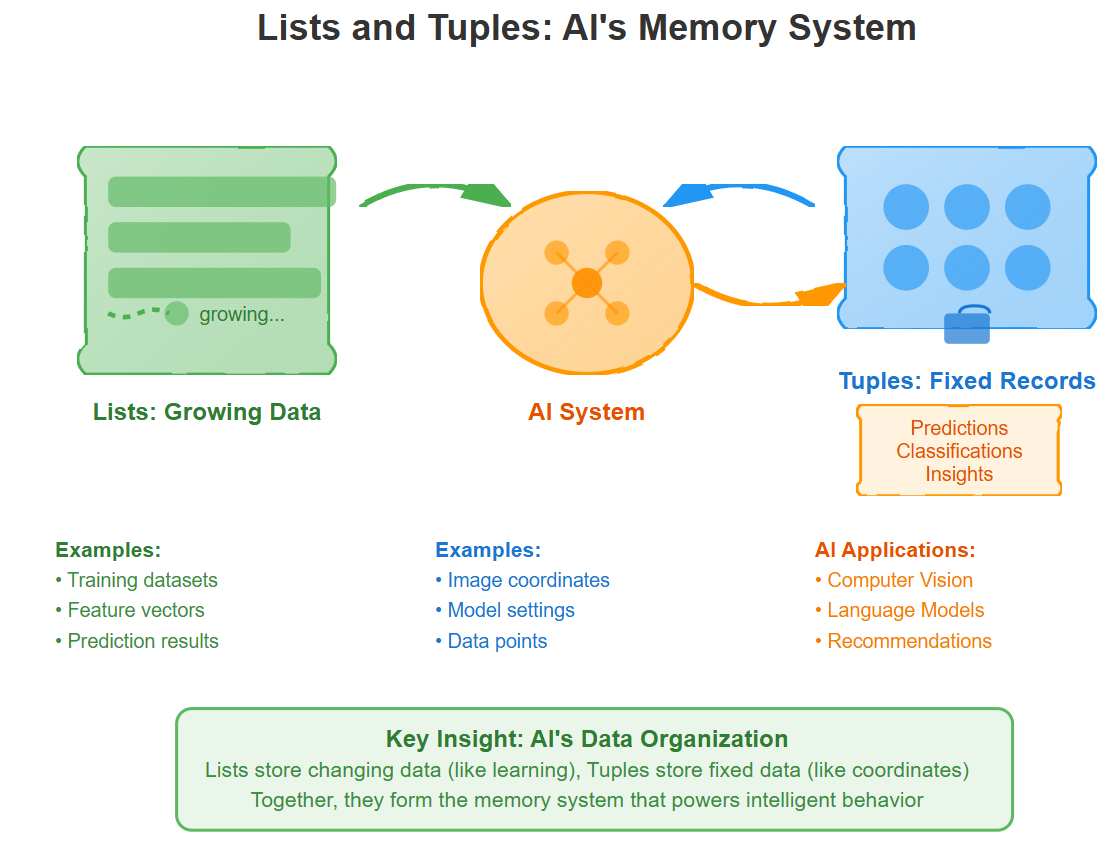
Think of an AI agent as having a sophisticated filing system. Every piece of information—whether it's recognizing faces in photos, understanding speech, or making predictions—gets stored and organized in specific ways. Lists and tuples are like the filing cabinets and folders that make this organization possible.
When ChatGPT processes your question, it's working with thousands of numbers organized in lists. When a self-driving car identifies objects, it stores their coordinates as tuples. These aren't just programming concepts—they're the fundamental building blocks that let AI systems remember, learn, and make decisions.
Core Concepts: Building AI-Ready Data Structures
1. Lists: The Dynamic Memory of AI
Lists in Python are like expandable containers that can grow and change as your AI agent learns. Imagine a security camera that starts knowing zero faces but gradually builds a list of recognized people.
# An AI agent's growing knowledge base
recognized_faces = []  # Starts empty
recognized_faces.append("Alice")  # Learns first person
recognized_faces.append("Bob")    # Learns second person
print(f"I know {len(recognized_faces)} people: {recognized_faces}")
The AI Connection: Machine learning models constantly update their knowledge. A recommendation system builds lists of user preferences, a language model maintains lists of vocabulary, and computer vision systems track lists of detected objects.
2. Tuples: Immutable Data Points
While lists can change, tuples are like permanent records—perfect for storing coordinates, configurations, or any data that shouldn't accidentally get modified. Think of GPS coordinates or RGB color values.
# Image coordinates that never change
top_left_corner = (0, 0)
image_center = (512, 384)
object_location = (234, 156)

# RGB color values for computer vision
red_pixel = (255, 0, 0)
blue_pixel = (0, 0, 255)
The AI Connection: Computer vision systems use tuples for pixel coordinates, neural networks store layer dimensions as tuples, and robotics systems represent 3D positions with coordinate tuples.
3. Nested Structures: Complex AI Data
Real AI systems combine lists and tuples to create sophisticated data structures. A face recognition system might store each person as a tuple, then keep all people in a list.
# Each person: (name, confidence_score, last_seen_location)
people_database = [
    ("Alice", 0.95, (120, 200)),
    ("Bob", 0.87, (300, 150)),
    ("Charlie", 0.92, (450, 180))
]

# Extract just the names
names = [person[0] for person in people_database]
print(f"Known people: {names}")
4. Data Processing Patterns
AI systems constantly filter, transform, and analyze data. Python's list comprehensions make this elegant and readable.
# Filter high-confidence detections (like AI does)
confident_detections = [person for person in people_database if person[1] > 0.9]

# Transform data (extract just coordinates)
all_locations = [person[2] for person in people_database]

# Calculate averages (basic AI analytics)
average_confidence = sum(person[1] for person in people_database) / len(people_database)
Implementation: Building a Mini AI Dataset Processor
GitHub Link:
https://github.com/sysdr/aiml/tree/main/day4/day4_lists_tuplesLet's create a realistic example that mimics how AI systems process training data. We'll build a simple image classification dataset organizer:
# dataset_processor.py - A mini AI data organizer

class ImageDataset:
    def __init__(self):
        # Lists that grow as we add data (like training an AI)
        self.images = []
        self.labels = []
        self.metadata = []

    def add_sample(self, image_path, label, dimensions):
        """Add a new training sample - like feeding data to an AI"""
        # Each image is a tuple of (path, size_bytes)
        image_info = (image_path, self.calculate_size(image_path))

        self.images.append(image_info)
        self.labels.append(label)
        # Metadata as tuple: (width, height, channels)
        self.metadata.append(dimensions)

    def calculate_size(self, path):
        """Simulate calculating file size"""
        return len(path) * 1024  # Simplified calculation

    def get_stats(self):
        """Analyze the dataset - like AI model evaluation"""
        total_samples = len(self.images)
        unique_labels = list(set(self.labels))

        # Calculate label distribution
        label_counts = {}
        for label in self.labels:
            label_counts[label] = label_counts.get(label, 0) + 1

        return {
            'total_samples': total_samples,
            'unique_labels': unique_labels,
            'label_distribution': label_counts,
            'average_size': sum(img[1] for img in self.images) / total_samples
        }

    def filter_by_label(self, target_label):
        """Filter data like AI systems do during training"""
        filtered_indices = [i for i, label in enumerate(self.labels)
                          if label == target_label]

        filtered_images = [self.images[i] for i in filtered_indices]
        filtered_metadata = [self.metadata[i] for i in filtered_indices]

        return filtered_images, filtered_metadata

# Demo: Using our AI-style data processor
def main():
    dataset = ImageDataset()

    # Add training samples (like feeding data to an AI model)
    dataset.add_sample("cat_001.jpg", "cat", (224, 224, 3))
    dataset.add_sample("dog_001.jpg", "dog", (224, 224, 3))
    dataset.add_sample("cat_002.jpg", "cat", (256, 256, 3))
    dataset.add_sample("bird_001.jpg", "bird", (224, 224, 3))

    # Analyze our dataset
    stats = dataset.get_stats()
    print("Dataset Analysis:")
    print(f"Total samples: {stats['total_samples']}")
    print(f"Categories: {stats['unique_labels']}")
    print(f"Label distribution: {stats['label_distribution']}")

    # Filter data (common AI operation)
    cat_images, cat_metadata = dataset.filter_by_label("cat")
    print(f"\nFound {len(cat_images)} cat images")

    # Show how lists and tuples work together
    for i, (image_info, metadata) in enumerate(zip(cat_images, cat_metadata)):
        path, size = image_info  # Unpack tuple
        width, height, channels = metadata  # Unpack tuple
        print(f"Cat {i+1}: {path} ({width}x{height}, {size} bytes)")

if __name__ == "__main__":
    main()
This example demonstrates exactly how real AI systems organize training data: lists for collections that grow over time, tuples for immutable data points, and processing patterns that filter and analyze information.
Real-World Connection: Production AI Systems
In production AI systems, these concepts scale massively:
Computer Vision: OpenCV stores image coordinates as tuples, object detection results as lists of bounding boxes
Natural Language Processing: BERT and GPT models process text as lists of token IDs, with each token position as a tuple
Recommendation Systems: Netflix stores user preferences as lists, movie features as tuples of (genre, rating, year)
Autonomous Vehicles: Tesla's FSD stores sensor readings as lists, GPS coordinates as tuples
The patterns you learned today—organizing data in lists, storing immutable information as tuples, and processing collections with comprehensions—are the exact same patterns used in million-dollar AI systems.
Next Steps: Tomorrow's Power-Up
Tomorrow we'll explore dictionaries and sets—the lookup tables and unique collections that make AI systems lightning-fast. You'll learn how ChatGPT instantly finds the right words and how recommendation engines match your preferences in milliseconds.
Your foundation in lists and tuples gives you the building blocks. Tomorrow, we'll add the speed and efficiency that makes AI feel magical to users.
Key Takeaway
You've just learned the memory system of AI. Every list you create is like giving an AI agent a way to remember and grow. Every tuple you define is like setting permanent coordinates in the AI's world. These aren't just data structures—they're the foundation that lets artificial intelligence store knowledge, recognize patterns, and make intelligent decisions.
Ready to continue building your AI agent? Tomorrow, we'll add the speed and lookup capabilities that bring it to life.