

What We Cover Today
Why raw text is useless to a neural network, and what preprocessing actually does
The tokenization spectrum: from character-level splits to subword vocabularies
How modern NLP pipelines (BERT, GPT, LLaMA) tokenize text at production scale
Building a preprocessing pipeline from scratch: cleaning, normalization, tokenization, and encoding
Where this sits in a live AI system’s data flow
Why This Matters
Yesterday you got the 10,000-foot view of NLP. Today you go one level down into the engine room. Every language model — whether it’s the BERT model powering Google Search or the GPT-4 backbone behind ChatGPT — starts with the exact same problem: text is just a sequence of Unicode characters, and neural networks only understand numbers.
Text preprocessing is the translation layer. It transforms messy, human-written language into clean, structured numerical representations that a model can actually learn from. Get this wrong and your model learns noise. Get it right and you’ve handed your model a consistent, information-dense signal. At companies like OpenAI, Hugging Face, and Cohere, entire teams are dedicated to tokenizer design — not because it’s glamorous, but because a bad tokenizer caps the ceiling on everything built on top of it.
Tokenizers are not utilities. They are model components.
Core Concepts
1. The Raw Text Problem
Neural networks are mathematical functions. They compute dot products, matrix multiplications, and nonlinear activations — all operations that require floating-point numbers. The sentence "The model crashed at 3am!!" has no numeric form until you create one.
Before you even think about tokenization, the text itself needs to be cleaned. Production text is full of HTML artifacts (&, <br/>), inconsistent Unicode, mixed case, multiple whitespace characters, and null bytes from encoding issues. These irregularities don’t just add noise — they fragment your vocabulary. "Apple", "apple", and "APPLE" would all become different tokens if you skip lowercasing. That’s three entries in your vocabulary table for the same semantic concept.
The cleaning phase handles:
Lowercasing (where appropriate)
HTML unescaping and tag stripping
Unicode normalization (NFC vs NFD)
Punctuation handling
Whitespace collapsing
This is not optional housekeeping — it directly determines vocabulary size, which determines model parameter count.
2. Tokenization Strategies
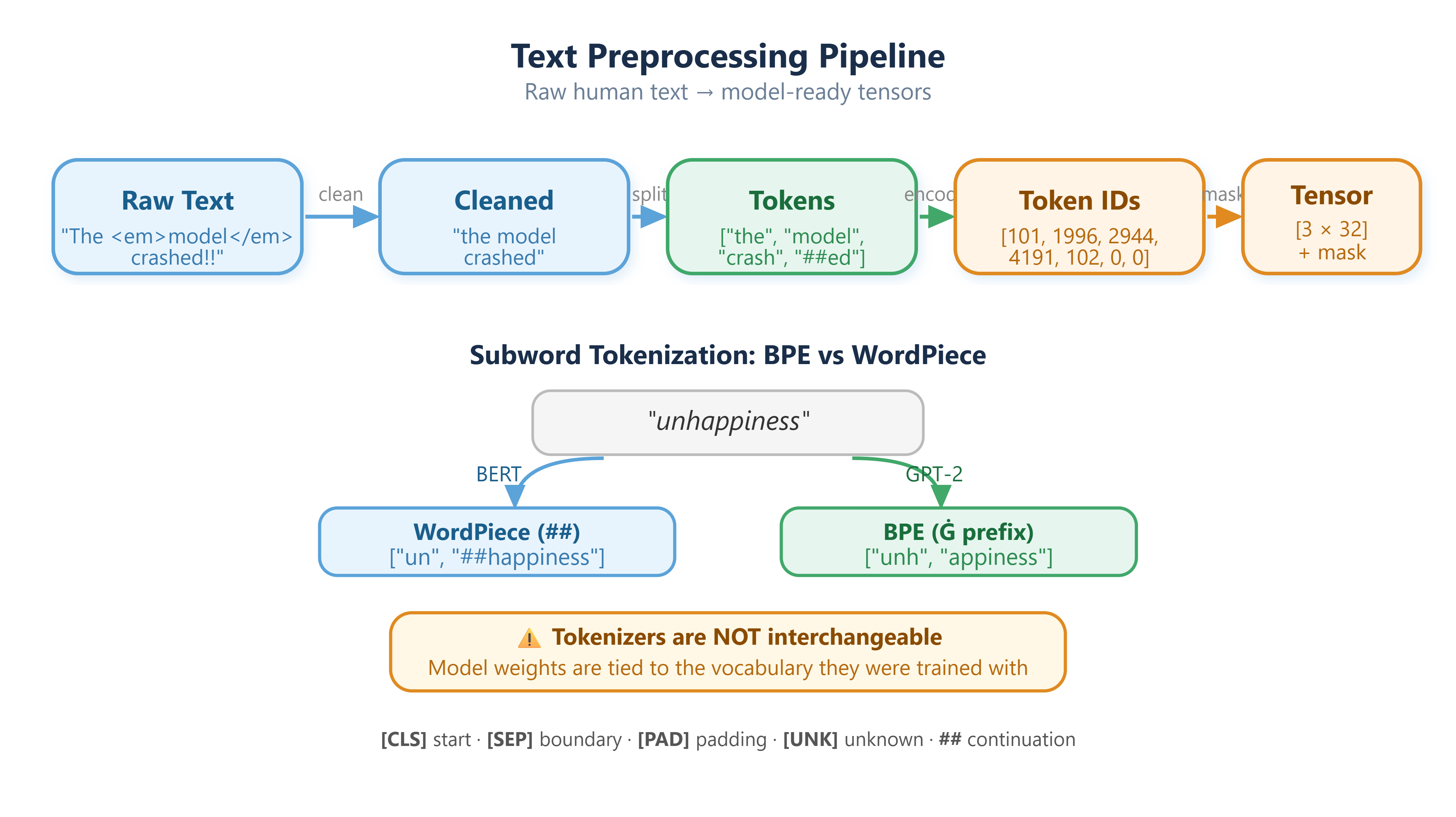
Tokenization is the act of splitting text into discrete units called tokens. Three main strategies exist, and each makes a different tradeoff.
Word-level tokenization splits on whitespace and punctuation. Simple and interpretable — "the cat sat" becomes ["the", "cat", "sat"]. The fatal flaw: out-of-vocabulary (OOV) words. If your training data never contained "transformer", the model has no representation for it at inference time. Vocabularies also explode — English alone has 500,000+ words, and that’s before you add technical jargon, names, and typos.
Character-level tokenization splits into individual characters. No OOV problem by definition — every character is in your alphabet. But sequences become extremely long, and the model must learn to compose meaning from scratch, which requires vastly more training data and compute.
Subword tokenization is the practical solution that modern systems use. The insight is elegant: keep common words as single tokens, but split rare or unknown words into meaningful sub-pieces. The word "tokenization" might become ["token", "ization"]. The word "unhappiness" might become ["un", "happiness"]. The model sees morphemic structure rather than opaque character soup.
Two dominant subword algorithms:
Byte Pair Encoding (BPE) — used by GPT-2, GPT-3, GPT-4, and LLaMA. Starts with character-level tokenization and iteratively merges the most frequent adjacent pairs until a target vocabulary size is reached.
WordPiece — used by BERT. Same general idea as BPE, but uses a likelihood-based merge criterion instead of raw frequency. Results in a vocabulary of 30,000–100,000 tokens that covers essentially any input text without OOV issues.
3. Vocabulary and Encoding
Once you have tokens, you need to map them to integers — this is the vocabulary lookup. The vocabulary is a dictionary: {"the": 0, "cat": 1, ...}. Every token in your corpus gets a unique integer ID. Special tokens are added explicitly to handle structural positions in a sequence.
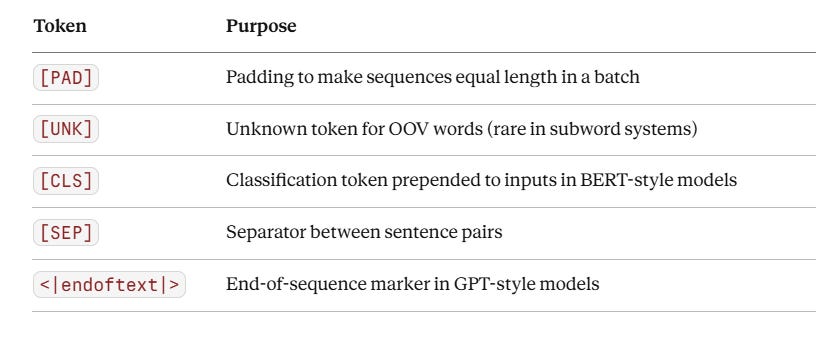
After encoding, each sentence is a list of integers. This is the actual input to the embedding layer — not the words themselves.
4. Attention Masks and the Padding Problem
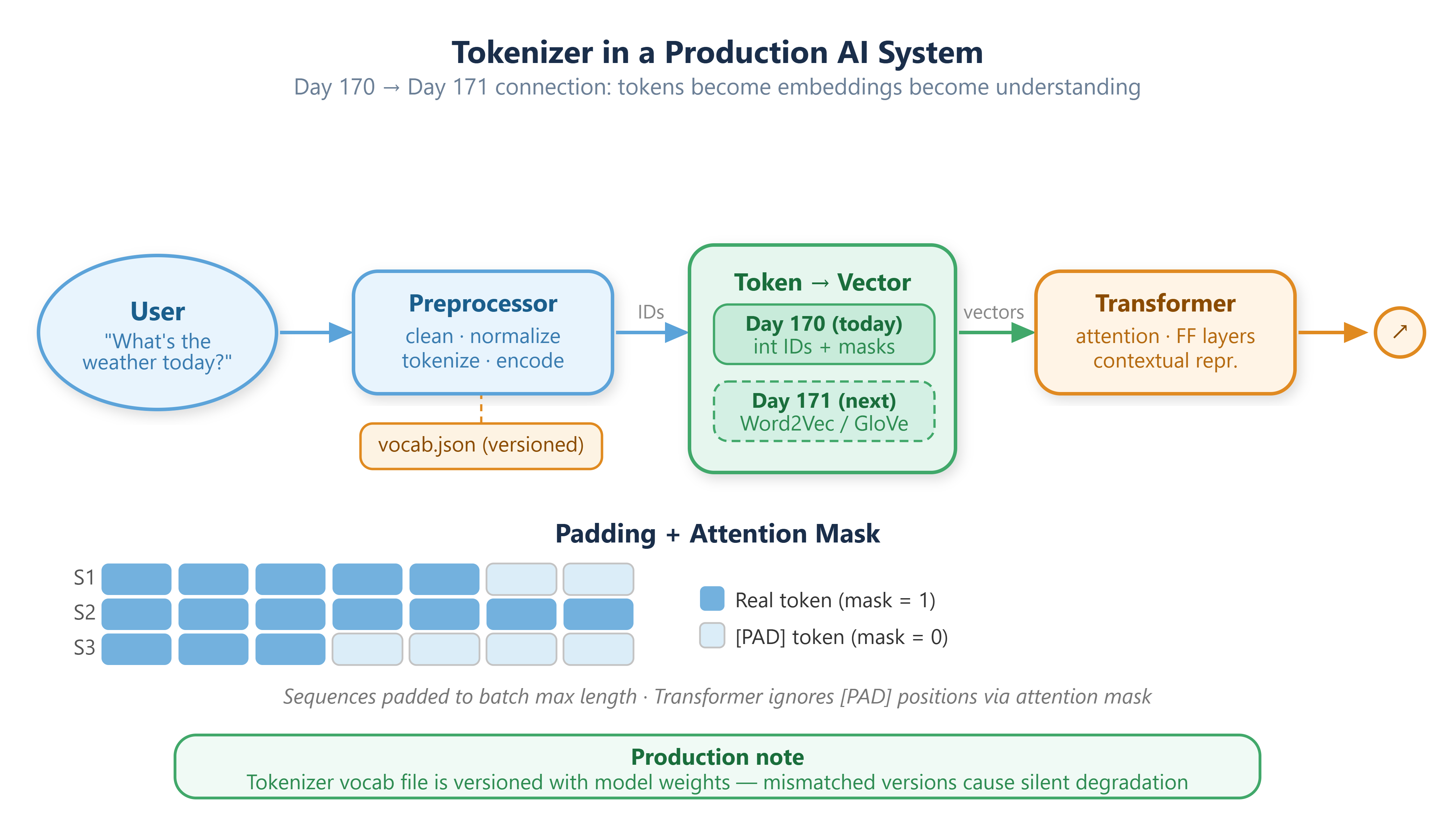
Batching sequences requires them to be the same length. But sentences are not. The solution is to pad shorter sequences with [PAD] tokens up to the maximum sequence length in the batch, then provide an attention mask — a binary vector marking which positions are real tokens (1) and which are padding (0).
The transformer’s attention mechanism uses this mask to ignore padded positions during computation. This is architectural plumbing that most tutorials skip, but it’s fundamental to how batched inference works at production scale.
Component Architecture
The preprocessing pipeline has five distinct stages. Each stage is stateless except the Tokenizer and Encoder — both depend on a trained vocabulary file (typically a .json or .txt vocab file loaded at startup). In production systems, this vocabulary file is versioned alongside the model weights.
Raw Input Text
      |
      v
+---------------------+
|   Text Cleaner      |  --> strip HTML, normalize unicode, collapse whitespace
+---------------------+
      |
      v
+---------------------+
|   Normalizer        |  --> lowercase, remove/keep punctuation, handle numbers
+---------------------+
      |
      v
+---------------------+
|   Tokenizer         |  --> split into subword tokens using BPE/WordPiece vocab
+---------------------+
      |
      v
+---------------------+
|   Encoder           |  --> map tokens --> integer IDs via vocabulary lookup
+---------------------+
      |
      v
+---------------------+
|   Padder/Masker     |  --> pad to batch length, generate attention masks
+---------------------+
      |
      v
 Tensor [batch_size, seq_len]  <-->  Model Input
Critical production note: Swapping a vocabulary file without updating the corresponding model weights is a silent failure mode. The model receives a different token distribution than it was trained on and produces degraded outputs with no error thrown. Tokenizer and weights are always versioned together.
Real-World Connection
At Stripe, every merchant-facing text field — chargeback descriptions, dispute notes, fraud explanations — passes through a preprocessing pipeline before hitting the risk classification model. The tokenizer there is trained on financial domain text to ensure that terms like "ACH reversal" and "NSF fee" are preserved as meaningful units rather than split arbitrarily.
At Google, the search query tokenizer handles 8.5 billion queries per day, many in low-resource languages where subword tokenization is the only viable strategy. The design of that tokenizer — its vocabulary size, its handling of numerals and punctuation — directly affects ranking quality for billions of searches.
Tokenizers are not utilities. They are model components.
Implementation: Build, Test and Demo
Github Link:
https://github.com/sysdr/aiml/tree/main/day170/day170_tokenization
What you will build: A complete, five-stage NLP preprocessing pipeline in Python, ending with batched tensors ready to feed directly into a BERT or GPT-2 model. All code lives in
lesson_code.py. The test suite (20 pytest tests) lives intest_lesson.py.
Expected output: a confirmation message and a listing of the five files created inside day170_tokenization/.
Step 1 — Set Up the Environment
Installs all pinned dependencies, and downloads the NLTK and spaCy data required for tokenization exercises.
Expected output: "Environment ready." followed by the activation command. If you see a warning about a missing Rust compiler, ignore it — the Hugging Face tokenizers library ships pre-compiled wheels.
With Docker instead:
docker build -t day170 . && docker run --rm day170
Step 2 — Run the Lesson Demo
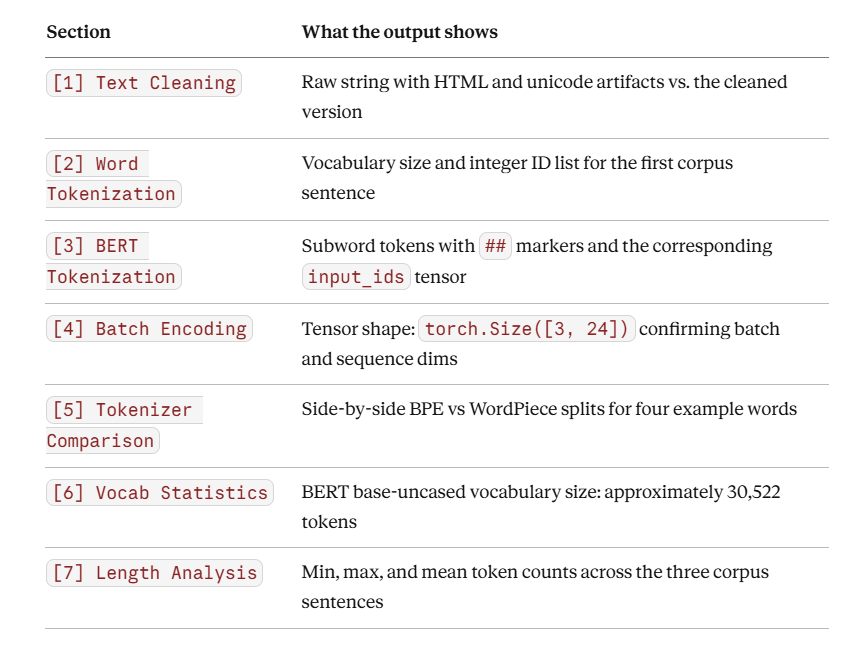
lesson_code.py runs all seven sections of the pipeline in sequence, printing labeled output for each stage. Read through the terminal output as it runs — every printed block corresponds to a Core Concept section above.
python lesson_code.py
Step 3 — Run the Test Suite
The test suite has 20 tests organized into six classes, each covering a distinct stage of the pipeline.
pytest test_lesson.py -v
Expected result: 20 passed in approximately 8 seconds. The first run will download the BERT and GPT-2 tokenizer files from Hugging Face (~500 MB total). Subsequent runs use the local cache.
To also see line coverage:
pytest test_lesson.py -v --cov=lesson_code --cov-report=term-missing
Step 4 — Key Exercises to Try Yourself
Exercise A — Compare tokenization of a medical vs. general sentence
from lesson_code import load_bert_tokenizer, bert_tokenize

tok = load_bert_tokenizer()
medical = "The patient presented with tachycardia and diaphoresis."
general = "The patient felt dizzy and was sweating."

print(bert_tokenize(tok, medical))
print(bert_tokenize(tok, general))
Pay attention to how the medical terms fragment into subwords. This is exactly why clinical NLP teams train domain-specific tokenizers.
Exercise B — Inspect the token distribution of a larger corpus
from lesson_code import load_bert_tokenizer, token_length_analysis

sentences = [
    "BERT uses WordPiece tokenization.",
    "GPT uses byte pair encoding.",
    "Both are subword tokenization methods.",
    "The quick brown fox jumps over the lazy dog.",
    "Tokenizers convert text into numbers.",
]

tok = load_bert_tokenizer()
print(token_length_analysis(tok, sentences))
Change max_length in bert_encode_batch to the max value from this analysis. Compare the number of padding tokens before and after.
Exercise C — Find where BERT and GPT-2 agree
from lesson_code import load_bert_tokenizer, load_gpt2_tokenizer, compare_tokenizers

words = ["running", "cats", "the", "AI", "unhappiness"]
result = compare_tokenizers(load_bert_tokenizer(), load_gpt2_tokenizer(), words)

for word, splits in result.items():
    match = splits['bert_wordpiece'] == splits['gpt2_bpe']
    print(f"{word:15s}  match={match}  bert={splits['bert_wordpiece']}")
Common English function words like "the" and "cats" produce identical single-token results in both tokenizers. Rare or morphologically complex words diverge.
Verification Checklist
Before moving to Day 171, confirm you can answer each of these from memory or by looking at lesson_code.py:
Why does skipping lowercasing inflate vocabulary size?
What does the
##prefix mean in a WordPiece token list?What is the integer ID for
[CLS]inbert-base-uncased? (Hint: checkbert_tok.cls_token_id)What shape does
bert_encode_batchreturn for 3 sentences padded tomax_length=32?Why do BERT and GPT-2 produce different splits for the same word?
What does a
0in theattention_maskindicate, and why does it matter?If you swap the
vocab.jsonfile without updating model weights, what happens at inference?